
A blurry logo can make even a great brand look unprofessional. You may have a logo that looks fine on your phone but turns pixelated when printed on a banner, sign, or large product.
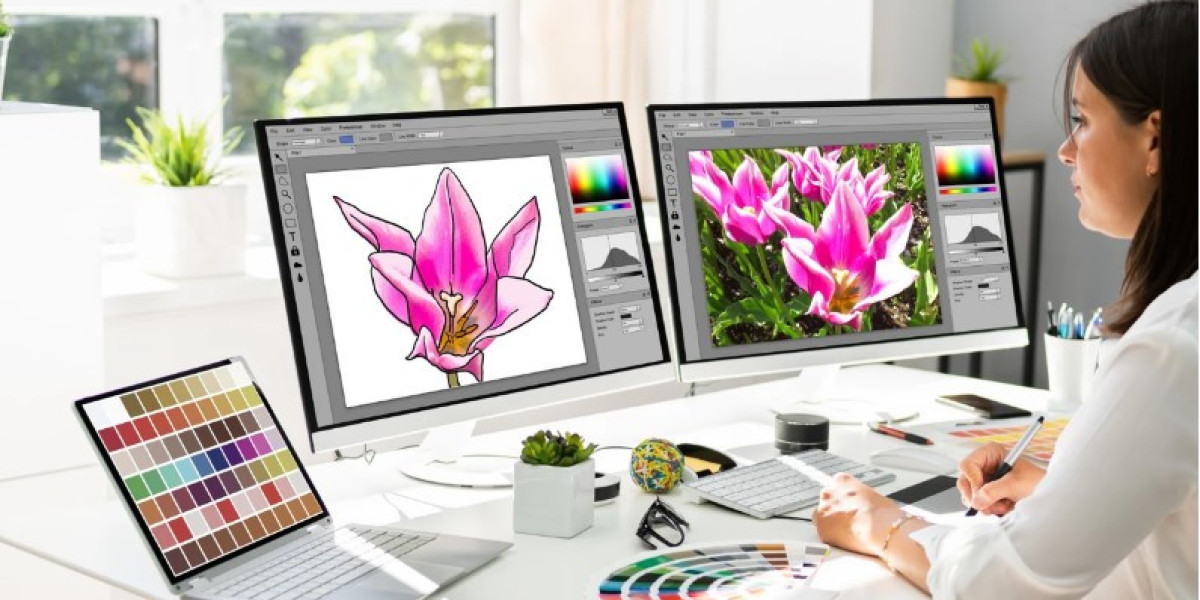
This is where High-Quality Vector Art Services can make a real difference. Vector artwork uses paths, shapes, curves, and colors instead of fixed pixels, allowing graphics to be resized without the same loss of sharpness associated with raster images.
Whether you need a logo for printing, promotional products, packaging, apparel, or digital use, properly prepared vector artwork gives you a flexible file that can work across many applications.
What Is Vector Art?
Vector art is digital artwork created using mathematical paths rather than individual pixels.
A vector graphic can usually be enlarged or reduced while keeping its edges clean and sharp. This makes vector files especially useful for logos, icons, illustrations, signs, and other graphics that may need to appear at different sizes.
Common vector file formats include:
- AI
- EPS
- SVG
Each format has different uses and compatibility requirements.
What Are High-Quality Vector Art Services?
High-Quality Vector Art Services involve creating, tracing, editing, or converting artwork into clean vector graphics that are suitable for their intended use.
For example, you might have a low-resolution JPG logo that looks blurry when enlarged. A vector artist can recreate the artwork using clean paths and shapes.
The result is not simply a larger version of the JPG. It is a properly constructed graphic that can be edited and scaled more easily.
Why Is Vector Artwork Important?
A good vector file can become a valuable master asset for a business.
Instead of keeping separate versions of a logo for every size, you can use a scalable vector version as a starting point for different applications.
Vector artwork is commonly used for:
- Business logos
- T-shirt printing
- Signage
- Labels
- Packaging
- Embroidery preparation
- Vehicle graphics
- Promotional products
- Website graphics
- Social media assets
Raster vs. Vector Graphics
Understanding the difference between raster and vector images makes the value of vector artwork easier to understand.
Raster Images
Raster graphics are made from pixels.
Common raster formats include:
- JPG
- PNG
- GIF
- TIFF
When a raster image is enlarged too much, individual pixels can become visible and edges may look blurry.
Vector Graphics
Vector graphics are built from paths and shapes.
Because the artwork is mathematically defined, it can be scaled to different sizes without becoming pixelated in the same way.
For example, a logo may need to appear on both a small business card and a large outdoor sign. A properly created vector file can support both uses.
What Does Vector Art Conversion Involve?
Vector art conversion is often called vector tracing or raster-to-vector conversion.
The process typically starts with an existing image such as a JPG, PNG, scanned drawing, or low-resolution logo.
The artwork is then recreated using vector paths.
1. Analyze the Original Artwork
The first step is to examine the source image.
The designer looks at:
- Shapes
- Lines
- Curves
- Colors
- Text
- Small details
- Image quality
This helps determine how much manual reconstruction will be required.
2. Create Clean Paths
The artwork is rebuilt using vector paths.
Curves and corners need to be carefully placed so the final graphic looks smooth at different sizes.
3. Recreate Colors
Colors are matched as closely as practical to the original artwork.
For print work, the color requirements may differ from those used for digital screens.
4. Refine Details
Extra points, rough edges, unwanted marks, and other imperfections are cleaned up.
This step is important because simply placing hundreds of automatic tracing points can create difficult-to-edit artwork.
5. Export the Required File
The finished vector artwork can then be exported in the format required for the project.
Benefits of High-Quality Vector Art Services
Professional vector artwork can provide several practical benefits.
Scalable Graphics
One of the biggest advantages is scalability.
A vector logo can be used at a small size for stationery or enlarged for signage while maintaining clean edges.
Cleaner Printing
Printers often need artwork with well-defined shapes and paths.
Proper vector files can make it easier to prepare graphics for different print applications.
Easier Editing
Vector artwork is usually easier to edit than a flattened raster image.
Individual shapes, colors, and elements can often be modified without rebuilding the entire graphic.
Professional Appearance
Clean curves, consistent shapes, and accurate colors can make artwork look more polished.
This matters particularly for business logos and branding materials.
Multiple File Options
A properly created vector master can often be exported into different formats depending on where the artwork will be used.
Common Uses for Vector Art Conversion
Different industries rely on vector graphics for different reasons.
Logo Vectorization
Businesses often have old logos saved only as small JPG or PNG files.
Vectorization can recreate those logos as scalable artwork.
T-Shirt and Apparel Printing
Print providers may require vector artwork for screen printing, vinyl cutting, or other production methods.
Clean paths make the artwork easier to prepare for these processes.
Sign and Banner Design
Large-format printing can expose problems in low-resolution images.
Vector artwork can provide sharp shapes and clean edges for large graphics.
Packaging
Packaging artwork may need to be resized across different products and box sizes.
A scalable vector file makes those adjustments easier.
Laser Cutting and CNC Applications
Some cutting systems require path-based artwork.
Properly prepared vector files can provide the clean outlines needed for cutting workflows, depending on the machine and software requirements.
What Makes a Vector File High Quality?
Not every vector file is professionally prepared.
A high-quality vector graphic should have clean and purposeful construction.
Smooth Curves
Curves should flow naturally rather than appearing uneven or lumpy.
Minimal Unnecessary Points
Too many anchor points can make artwork difficult to edit and may create rough curves.
A skilled designer generally uses points where they are actually needed.
Accurate Shapes
Important shapes should match the original artwork closely while remaining clean and editable.
Organized Layers
For complex artwork, logical organization can make future editing much easier.
Correct Colors
Colors should be prepared according to the intended application, whether that means digital display, print production, or another process.
Vector File Formats You Should Know
Choosing the right file format depends on how you plan to use the artwork.
AI
AI is a common editable vector format used in professional design workflows.
EPS
EPS is widely used for sharing vector artwork across different graphics and print workflows.
SVG
SVG is particularly useful for websites, digital interfaces, icons, and other applications that support scalable web graphics.
A PDF can contain vector artwork and is commonly used for sharing and print workflows, although the exact contents depend on how the PDF was created.
Before delivering a file, confirm which format your printer, designer, or production provider requires.
Automatic Tracing vs. Professional Vectorization
Many design programs include automatic tracing tools.
These tools can be useful for simple graphics, but automatic tracing is not always enough for professional artwork.
Complex logos may contain curves, overlapping shapes, small text, and unusual details that require manual adjustment.
Automatic Tracing Can Create:
- Too many anchor points
- Uneven curves
- Incorrect shapes
- Unwanted artifacts
- Difficult-to-edit paths
Professional vectorization focuses on the structure of the artwork rather than simply generating a large number of paths.
How to Prepare Artwork for Vector Conversion
You can make the process easier by providing the best source image available.
Use the Highest-Quality Source
If you have several versions of the artwork, provide the clearest and largest one.
Provide Brand Information
If exact colors matter, provide available color references whenever possible.
Explain the Final Use
Tell the designer whether the artwork will be used for:
- Printing
- Embroidery
- Signage
- Packaging
- Web design
- Promotional products
- Cutting
The final application can affect how the artwork should be prepared.
Identify Important Details
If certain parts of the logo must remain exactly as they are, point them out before the work begins.
Vector Art for Embroidery
Vector artwork and embroidery digitizing are different processes, but they can work together.
A vector logo can provide clean artwork that a digitizer can use as a reference when creating an embroidery file.
However, a vector file itself is not normally an embroidery file.
For embroidery, the artwork must be converted into stitch instructions through digitizing.
The workflow may look like:
Vector artwork → Embroidery digitizing → Machine-ready embroidery file
This distinction is important when preparing logos for apparel.
How to Choose a Vector Art Service
If you are hiring a professional, do not focus only on price.
Consider the quality and suitability of the service.
Review Previous Work
Look for examples involving artwork similar to yours.
A designer experienced with simple logos may have a different skill set from someone who handles detailed illustrations.
Ask About File Formats
Make sure the final delivery includes the formats you actually need.
Explain Your Intended Use
Tell the service where the artwork will be used. This helps the designer prepare the file appropriately.
Check Revision Policies
Ask whether reasonable corrections or revisions are included.
Request Editable Artwork
If you expect to modify the design later, confirm that you will receive an editable vector file rather than only a flattened preview.
Common Vector Artwork Problems
Poor vectorization can cause problems later in the production process.
Jagged Curves
Uneven curves can become obvious when the artwork is enlarged.
Excessive Anchor Points
Too many points can make a file difficult to edit and may create rough edges.
Incorrect Colors
Colors may look different between screen and print, especially when different color systems are used.
Missing Details
Automatic tracing may fail to reproduce small elements correctly.
Non-Editable Artwork
Some files may appear to be vector files but contain embedded raster images instead of true vector paths.
Always verify the actual structure of the delivered artwork when editable vector graphics are required.
Final Thoughts
High-Quality Vector Art Services can turn blurry, low-resolution, or difficult-to-edit artwork into clean and flexible graphics.
The real value of vectorization is not simply making an image larger. It is rebuilding the artwork with proper paths, curves, shapes, colors, and structure so it can be used across different applications.
Before ordering vector art conversion, provide the clearest source file available and explain how you plan to use the artwork. For professional results, look for clean paths, smooth curves, accurate colors, and properly editable files.
A well-prepared vector master can become the foundation for printing, branding, packaging, signage, apparel, digital graphics, and many other creative projects.
FAQs About High-Quality Vector Art Services
What are High-Quality Vector Art Services?
High-Quality Vector Art Services involve creating or converting artwork into clean, scalable vector graphics using paths, curves, shapes, and colors.
Can a JPG be converted into a vector file?
Yes. A JPG can be manually traced or recreated as vector artwork. The quality of the result depends on the source image and the complexity of the design.
Which file formats are considered vector files?
Common vector formats include AI, EPS, SVG, and certain types of PDF files. The exact format you need depends on the intended application.
Why is vector art better for logos?
Vector logos can be resized for different applications while maintaining clean edges. They are also generally easier to edit and adapt for print and digital use.
Is vector conversion the same as embroidery digitizing?
No. Vector conversion creates scalable graphic artwork, while embroidery digitizing converts artwork into stitch instructions for an embroidery machine. A vector logo can, however, be used as source artwork for digitizing.